Offering a way for local farms to sell directly to customers
Truck 2 Table needed a way for customers and farmers to communicate about the meals on offer, and for customers to buy complete meals straight from the source. That meant a solution for the consumer and a solution for the farmer.
Role
Product Designer
Client
Truck 2 Table
Duration
2 months
Scope
User flows, IA, prototypes, UI
The Approach
Two sides of one transaction, designed together
I led research interpretation, information architecture and workflow mapping, prototypes, and UI design. The scope covered defining the user journeys, mapping the information architecture, and creating a complete UI for both the customer and the farmer.
Stakeholders decided early that this would start as a mobile app, with a dedicated web app to handle the full service transaction later.
- 01
Map both sides first
Showing the customer and farmer flows side by side made the needs of each visible before any UI was drawn.
- 02
Let real constraints shape the structure
A client limitation on logins changed the architecture, so the design followed it instead of working around it.
- 03
Protect the handoff
The moment a meal changes hands is where mix-ups happen, so the flows add checks for exactly that moment.
Part 01 · Flows
Original user flows
The Problem
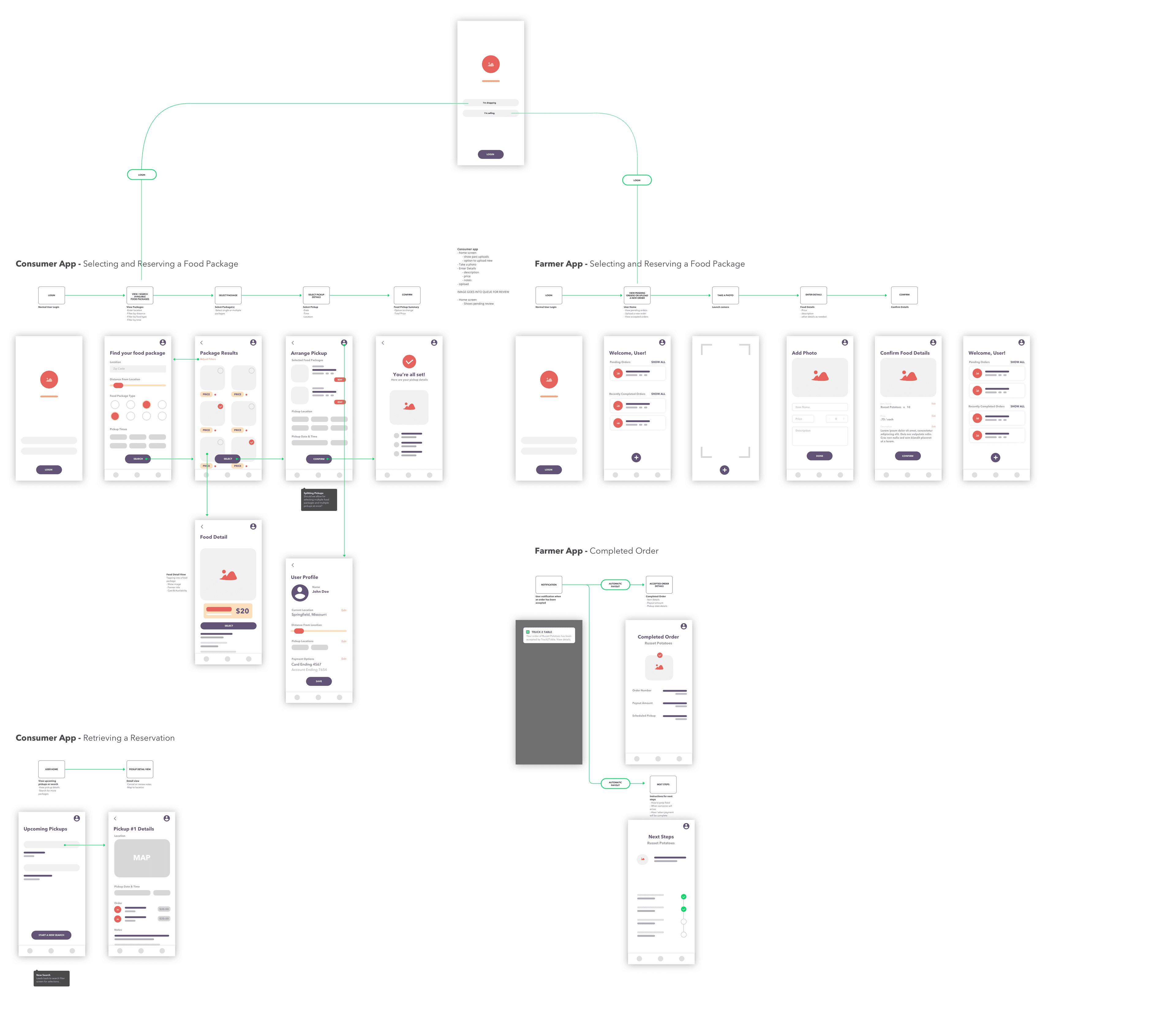
The goal was to understand how many steps each side needed to complete a transaction. We also uncovered limitations on the client side related to logins for different types of users.
T2T wasn't able to build a login flow that let farmers and customers use the same interface and switch depending on the type of user.
The Solution
Showing both flows side by side let us see the needs of the customer and the farmer from a UI perspective.
The result was a decision to make two separate applications: one for the customer to place orders, and one for the farmer to fulfill and check orders.
Details Worth Noting
Shared entry point
Both flows start from a single login screen that asks whether the user is shopping or selling.
Post-order moments are mapped too
The flows cover retrieving a reservation and the farmer's completed order, not only the purchase itself.
Part 02 · Customer
Selecting and reserving a food package
The Problem
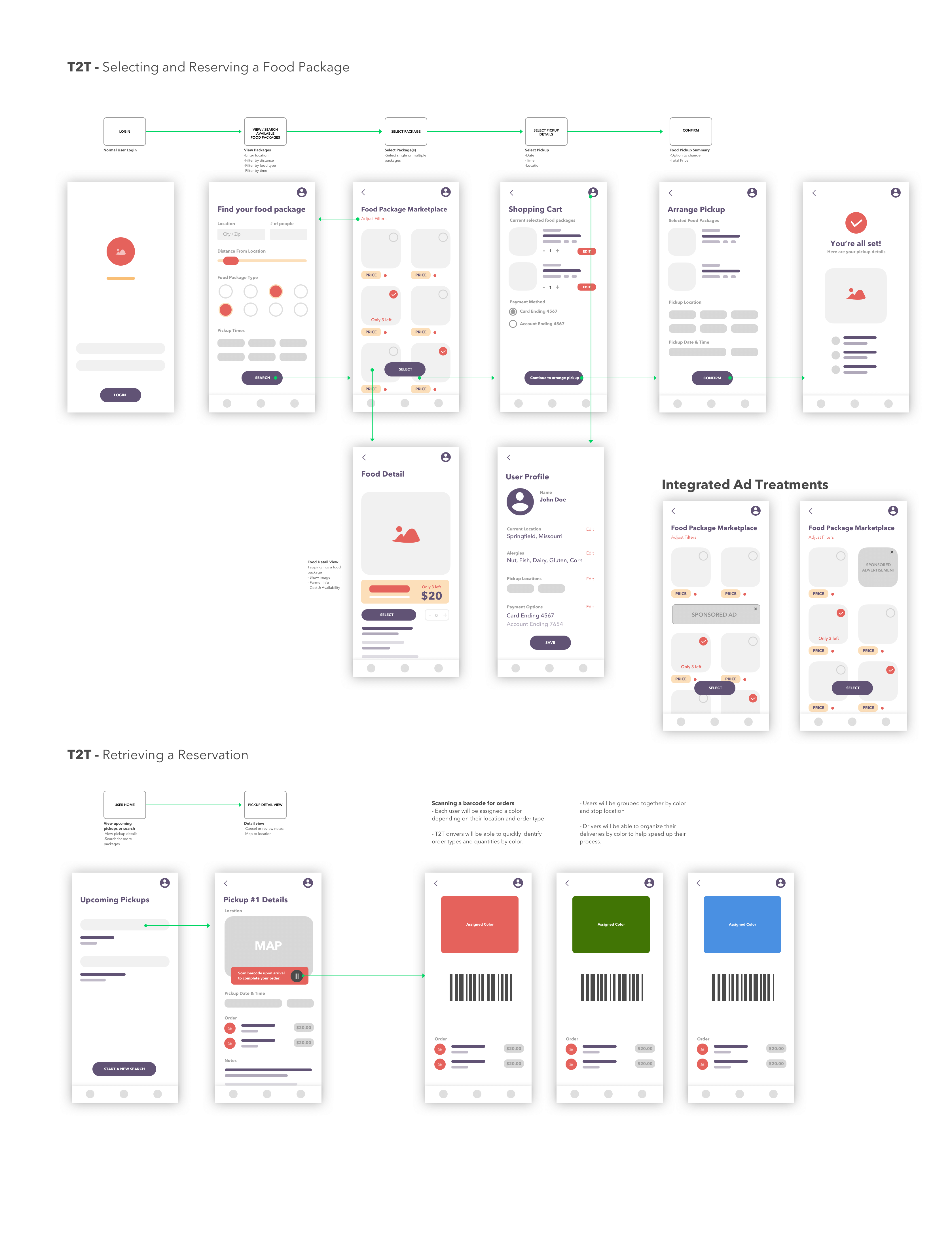
Customers needed to narrow down food packages and understand what they were getting, including ingredients, pickup times, and details, before confirming.
Farmers and drivers also needed a way to tell orders and locations apart to avoid confusion when delivering multiple orders.
The Solution
The refined customer flow starts with an initial filter to narrow the results, then moves through food details and confirmation.
It also informed an experience around retrieving a reservation, which lets farmers differentiate order types and locations so drivers can group by location.
To make sure meals don't get mixed up, farmers scan a barcode on the customer's phone to confirm they're handing over the right order.
Details Worth Noting
Filter first
Search starts with location, distance, package type, and pickup times, so the results list is already relevant.
Reservation stays reachable
Upcoming Pickups leads to a detail view with the map, pickup time, and order, so customers can find their order again.
Part 03 · Farmer
Adding product and selling in bulk
The Problem
Farmers needed a simple way to put what they grew on the market, and most grew large amounts of fruits and vegetables.
The Solution
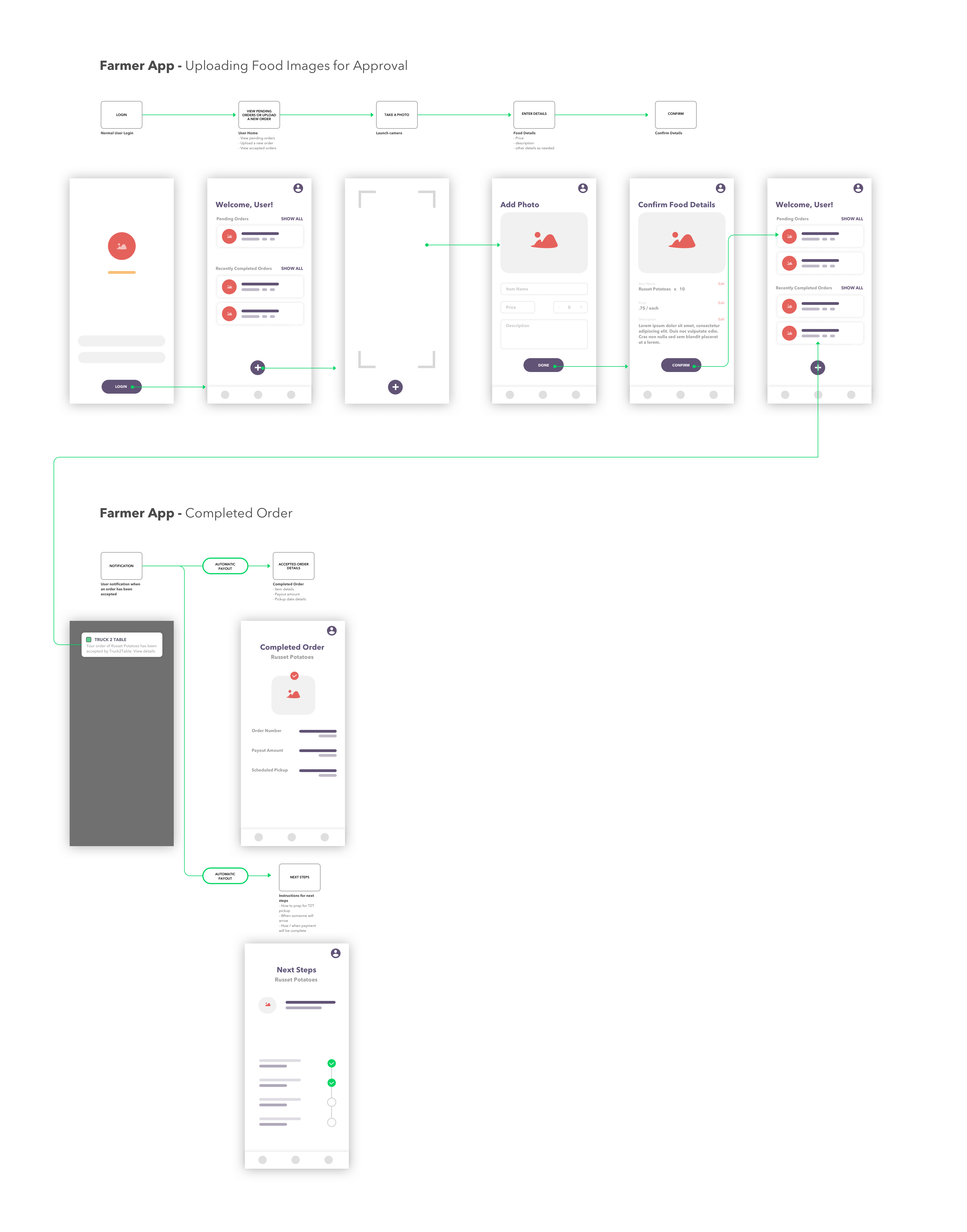
The farmer flow is fairly straightforward: take a picture of the ingredients, upload the image, assign a price, and put it on the market for customers.
A price per weight increment lets restaurants order directly from farmers, not only individual customers, which gives farmers a way to sell in bulk.
I also mapped a bulk flow with a user split from the start to separate the two sides. Ultimately, that option wasn't used.
Details Worth Noting
Camera first
Listing starts by launching the camera, so the photo is the first step of adding an item.
Clear confirmation
A confirm screen summarizes the item, price, and details before it goes live.
Part 04 · UI
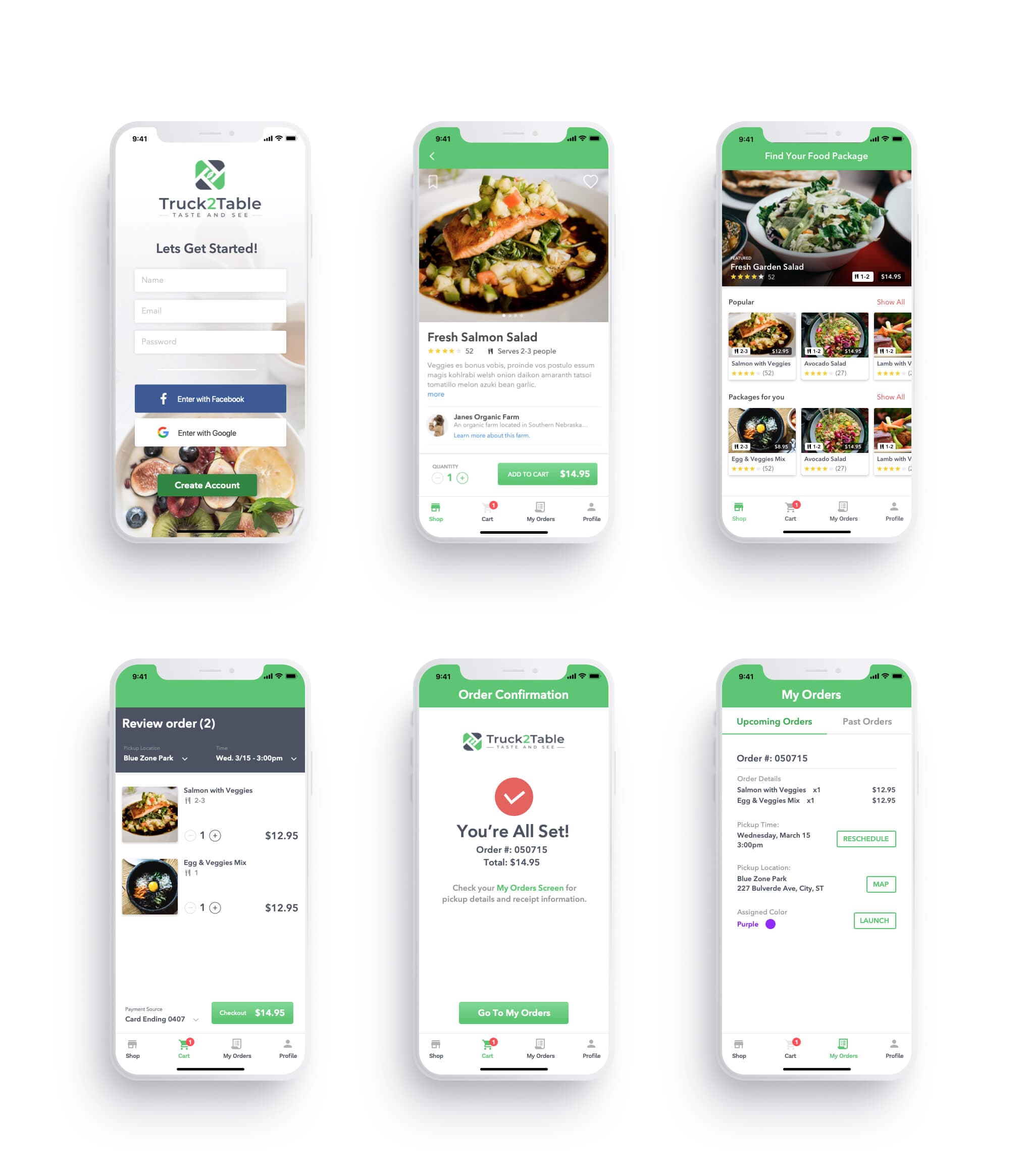
Final mobile designs
The Problem
The flows needed to become a complete, consistent UI that a first-time customer could pick up without instructions.
The Solution
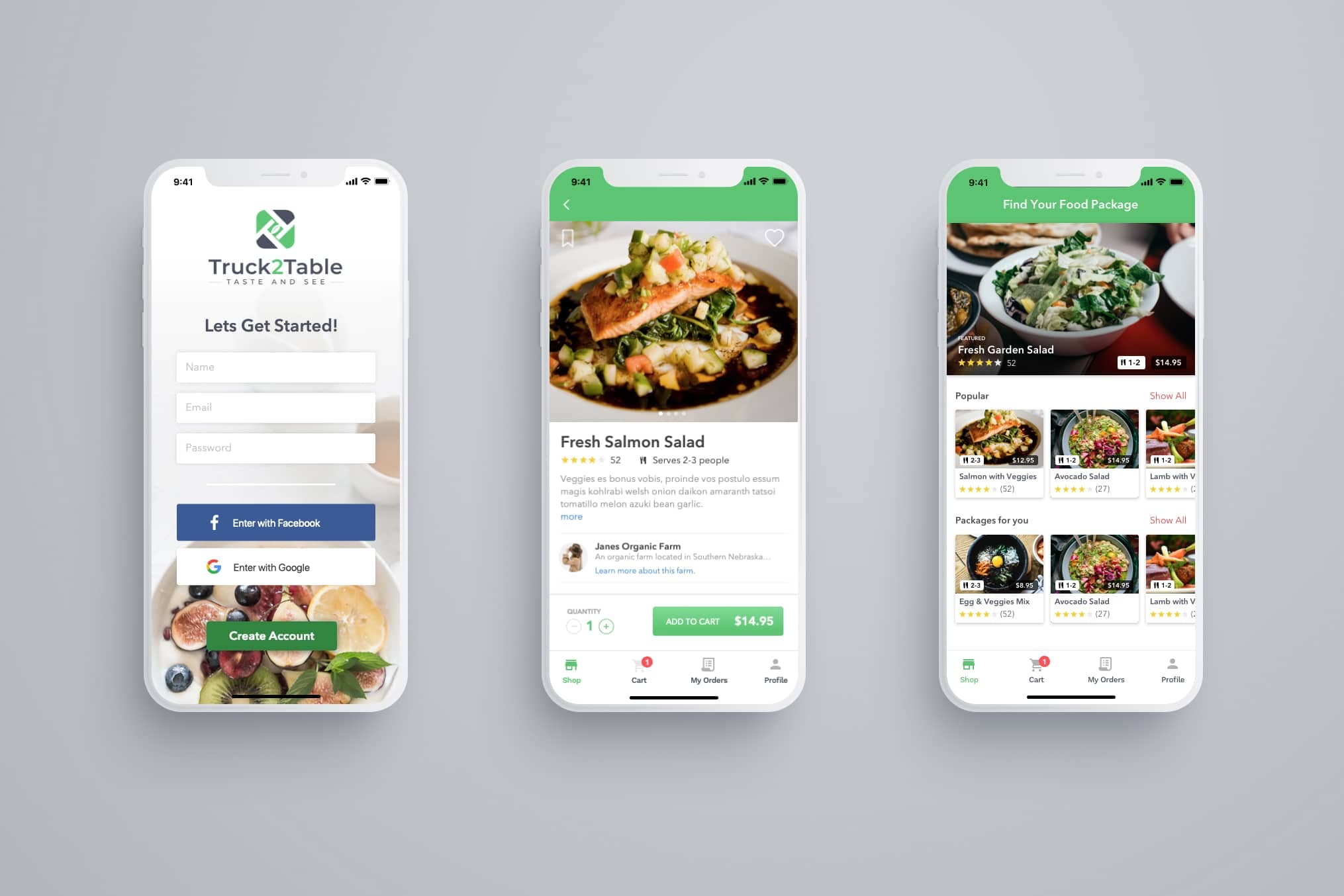
The final designs carry the flows through the customer experience, from sign up and browsing to reviewing an order, confirming it, and checking it under My Orders.
We then released a small beta to around 100 customers and 10 local farmers who had shown interest in new ways to sell what they grew. The goal was to learn how convenient buying directly from farmers is, and how this model affects their inventory.
Details Worth Noting
Pickup details up front
Review order puts pickup location and time at the top, so customers confirm them before paying.
Reschedule and map in place
My Orders keeps Reschedule, Map, and the assigned color on the order itself.
Next Case Study